
HIGH VOLTAGE BMS 16S-512S WITH ACTIVE BALANCE 2A
HV BMS/High Voltage BMS 16S ~512S with active balance 2A for photovatic energy storage;
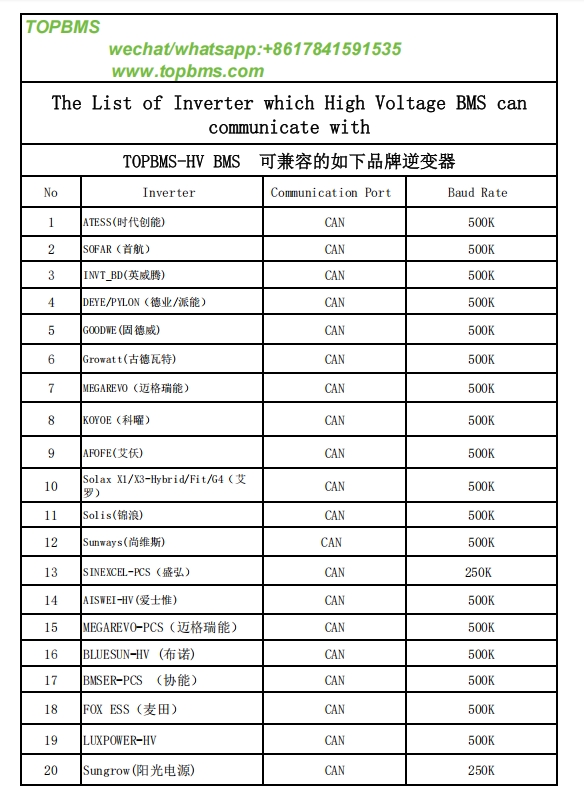
The high voltage bms can communicate with these HV Inverters:DEYE,GOODWE,ATESS,SOFAR,INVT_BD,PYLON,GROWATT,MEGAREVO,KOYOE,AFOFE,
Solax(X1/X3-Hybrid-G4),Solis,Sunways,SINEXCEL-PCS,AISWEI ,Bluesun,
FOX-ESS,LUXPOWER, Sungrow;
This HV BMS/High Voltage BMS 16S ~512S can keep balancing cells at 2 ampere
and you can set cell balancing starting voltage (range 1.5V-4.2V) and cell voltage difference >= 10MV;
This High Voltage BMS is compatible with Both Lithium-ion batteryand Lifepo4 Battery / lithium-titanate battery/Sodium ion battery ;
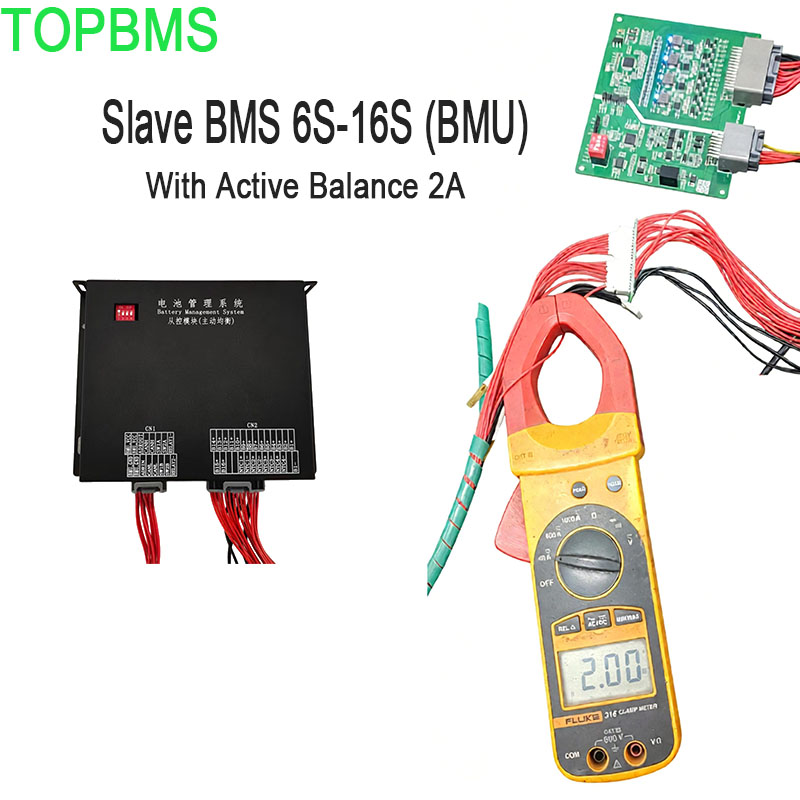
Test Video of Balancing Performance :
BMS Basic Protocals (Modbus Protocals)
HV BMS Modbus Protocals_EN-TOPBMS.pdf
User Manual of HV BMS 16S -512S with active balance 2A -English version
 Master BMS Configuration Via RS485 to USB - TOPBMS - V2.pdf
Master BMS Manual -TOPBMS - V1.pdf
HV BMS Monitoring System - TOPBMS-V2.pdf
Instruction of Master BMS Configuration -TOPBMS - V2.pdf
TOPBMS_BMU_Slave_with_Active_Balancing_Specification_EN.pdf
This High Voltage BMS is compatible with Lithium-ion battery /Lifepo4 Battery / lithium-titanate battery/Sodium ion battery
This HV BMS/High Voltage BMS 16S ~512S can keep balancing cells at 2 ampere and you can set cell balancing starting voltage (range 1.5V-4.2V) and cell voltage difference >= 10MV;
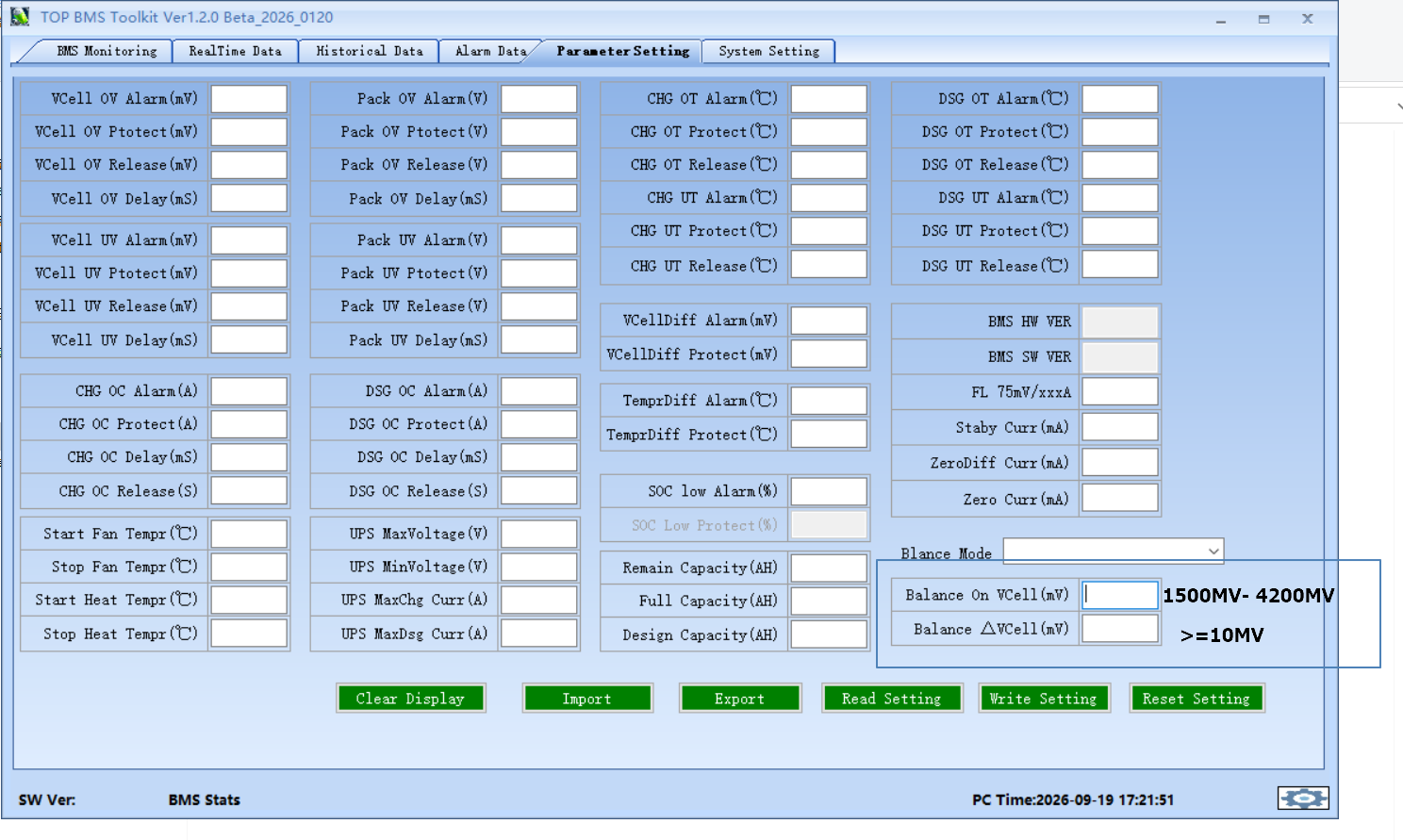
and you can switch on or switch off active balance in the bms pc software , Please see below :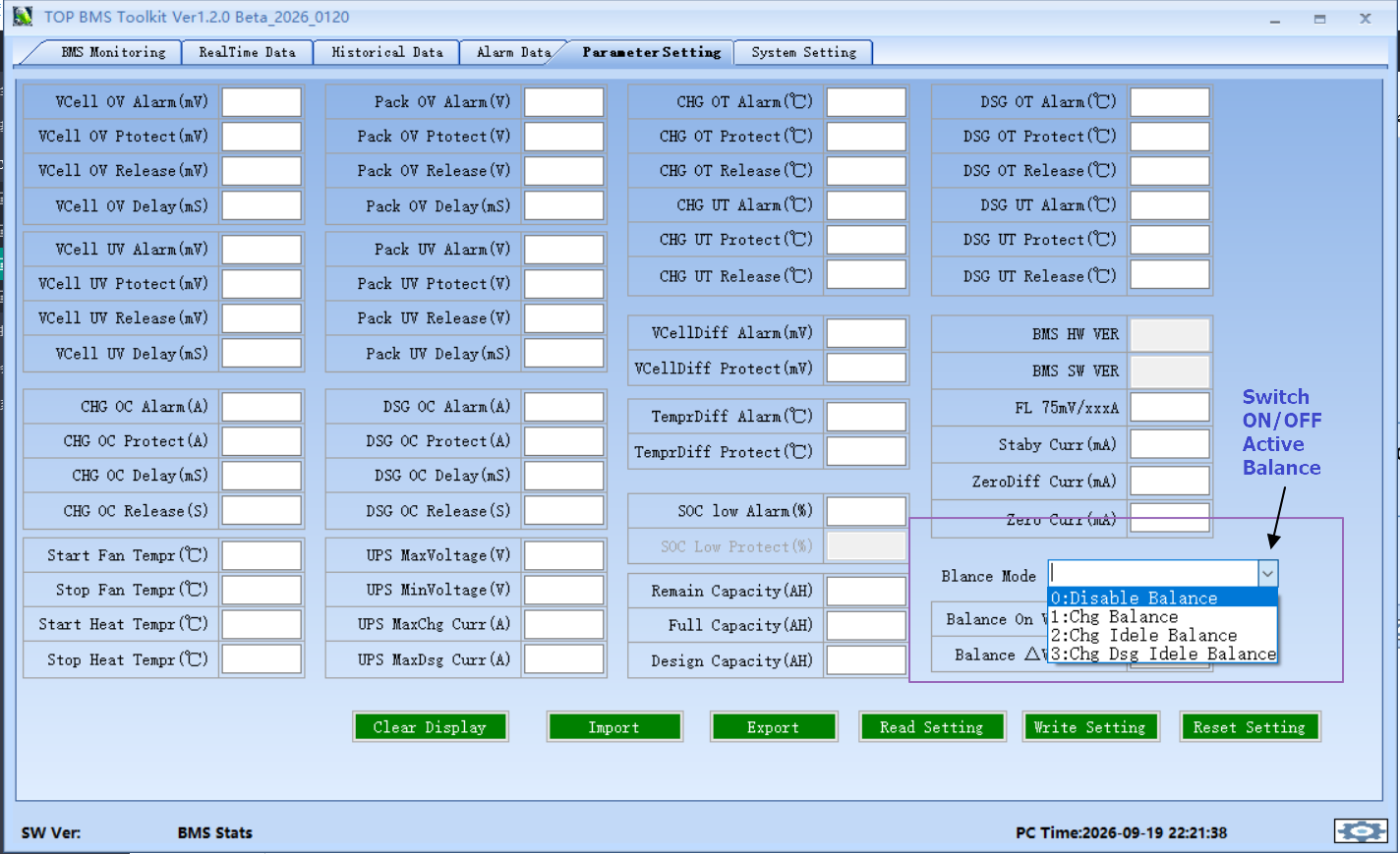
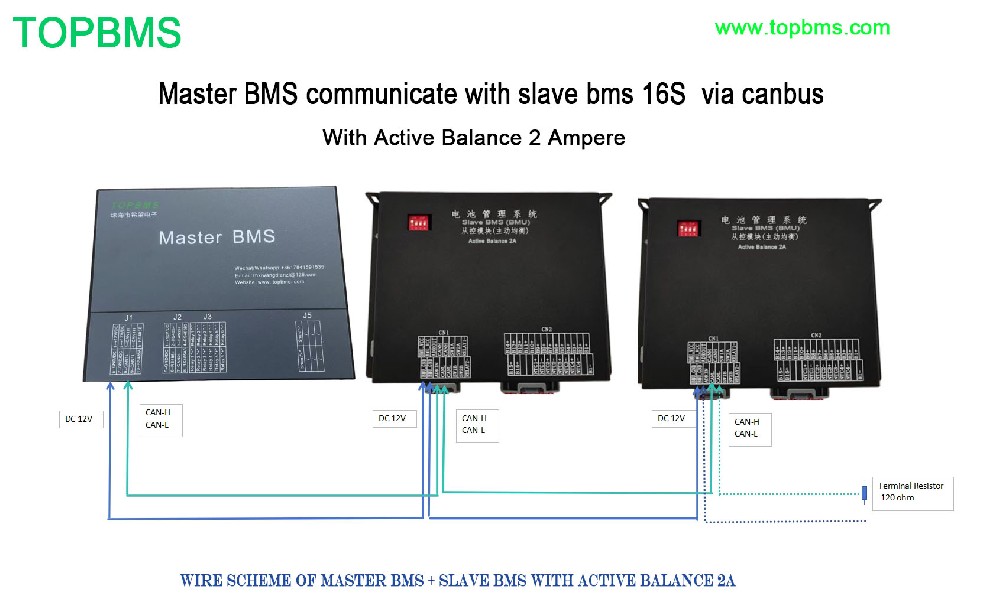
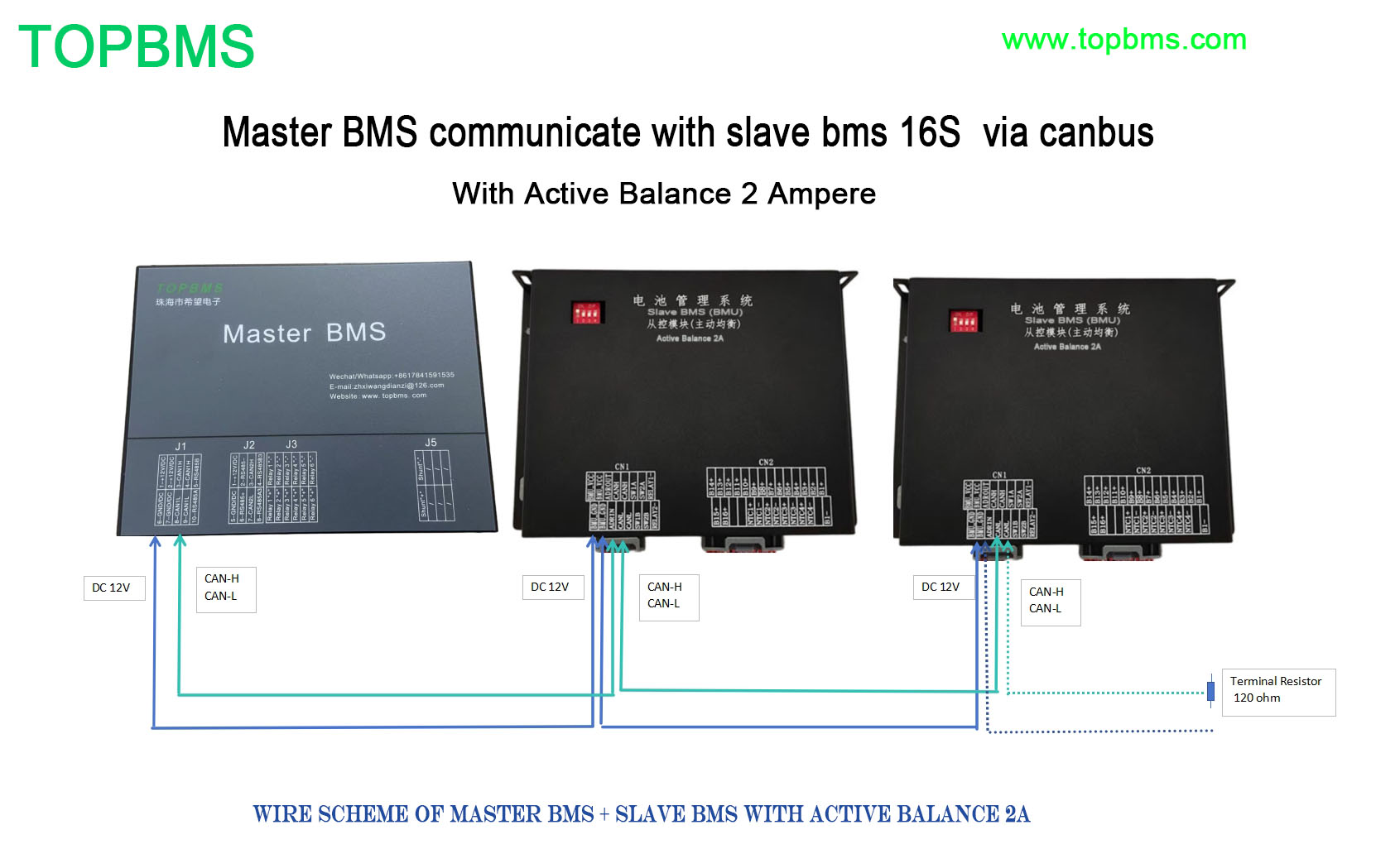
New Version of HV BMS wiring scheme :

For better resolution of bms diagram ,please check the inserted PDF file;
New Version of BMS wiring scheme_V1.6.pdf
Attention : when you do wiring , please check whether or not the ground of the DC-DC power supply is connected to the
housing of the high Voltage box, and the housing of the high voltage box should be grounded. And the case of all batteries
should also be grounded!
This bms can talk to inverter:
(DEYE,GOODWE,ATESS,SOFAR,INVT_BD,PYLON,GROWATT,MEGAREVO,KOYOE,AFOFE,Solax,Solis,
Sunways,SINEXCEL-PCS,AISWEI ,Bluesun,FOX ESS,Luxpower)
Master BMS Configuration PC Softwarfe(Password: 123456)
The lastest Version of BMS Newest Firmware
HW17X_V53A_2026_0416-Final.rar
The firmware can solve F56 /F57 /F58 Error which appears in the deye inverter !!

Please update your master bms with the firmware V533;
Before firmware update , please save all configuration,after firmware update , please selcect " deye 德业“ in BMS pc software;

But you need to be aware of the following points which can cause the F56 /F57 Error as well:
DC wire unable to handle amper of discharging add a 25mm wire from your battery to inverter;
if your battery gets equal or lower to shutdown value, it will throw an error.. you need to manualy restart your inverter
Your battery maybe 30% or 70% or 90%, but if it is lower than Shutdown, F56 will happen.

How to change language of pc software ?
How to enter passowrd before you configurate bms ? See below 
Master BMS is used to configurate the charging cut-off / discharging cut-off /Over current cut-off / Balance starting /Inverter Communication / Inverter charging cut-off / Invert discharging cut-off /Cell strings ,etc. Let me take BMS 48S for example ,
please see the following configuration


What is the standby current ?
Standby current means BMS self power consumption which is 500mA ; Please enter 500 here ;Please see below :

Before you set /calculate SOC , please enter password: 123456;
How to get correct SOC now?
Set the design capacity / full capacitu / residual capacity in the pc software as below ;
regarding the residual capacity , please enter 1/2 full capacity
and then take a complet cycle of discharging and charging ; finally the SOC will be calibrated automatically

How to calibrate the current ?
Please adjust the FL CHG/FLDSG factors if charge current discharge current is not in line with actual current


Before current calibration , please check if the setting of shunt is in line with the actual parameters of the shunt you use

How to set " Standy by curremt ",“Zero diff Current ” , "Zero Current"

How to set cell balancing in the PC software ?

HV BMS Montoring User Manual
How to get display work ?

if you don't select "DWIN TFT" , the display show all " 0"

Display Instruction of HV BMS- TOPBMS
Display Instruction of HV BMS- TOPBMS.pdf


Cable for RS485 to USB
Driver Software (UT-8890)of Converter of RS485 to USB

Driver Software (UT-885/890/2003A/880/8801)of Converter of RS485 to USB

T-885、890、2003A、880、8801 DRIVER.rar
Driver Software (CH340 for Win11)

Driver Software (CH340 for Win7,8,9,10)
CH348 Driver for win7 ,8 ,10.zip
you need to change the settings of converter via RS485 transmission cable ; if not , the converter cannot work properly


Master BMS Firmware Update :

Battery capacity Settings in the BMS Monitoring Systerm Software
